
 Dale Shelabarger

Iteration 8 of How Syrve Works is now live. In our eighth explainer, we look at a feature that doesn’t get as much airtime as some of the other tools within our platform: the Website Builder App - it’s an important component that’s taken on an even greater meaning due to the rise of third-party delivery services. So, let’s delve.
Why Is a Restaurant Website Important?
If you don’t know the answer to this question then you’ve got a lot of catching up to do with regards to online marketing - roughly three decades’ worth. The fact is that ensuring your restaurant has a companion website is critical if you want to attract visitors, providing customers with a reliable place to find accurate information about your menu, opening hours and location.
What Constitutes a Good Restaurant Website?
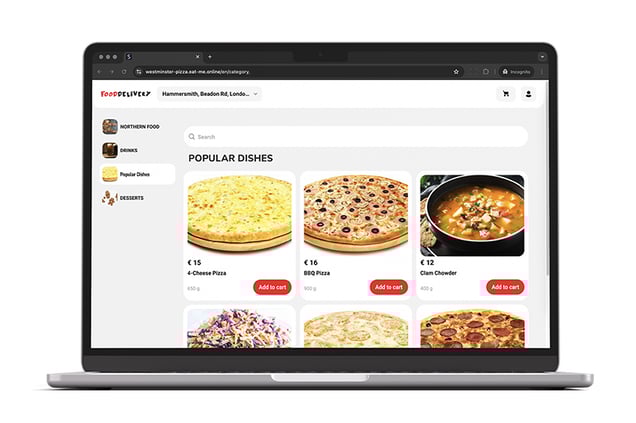
A good restaurant website in 2025 is fast, mobile-friendly and focused on user intent. Critical information relating to menus, opening hours, bookings, online ordering and location should be displayed clearly.
For a food service operator especially, the website should also include high-quality food and premises photography (no stock imagery), as well as the usual best practice fundamentals such as simple navigation, accessible design and fast page loads.
Ideally, a modern site should also integrate seamlessly with your in-house POS system as well as third-party delivery platforms.
What You Need to Set Up a Website
Setting up a website can be a complex business, particularly if you want to accept online orders and process personal information securely. These features require the use of databases, payment gateways and data encryption. For many operators, this kind of set-up can becomes overwhelming, especially when you factor in the pressures of day-to-day operations.
How Syrve Simplifies the Process
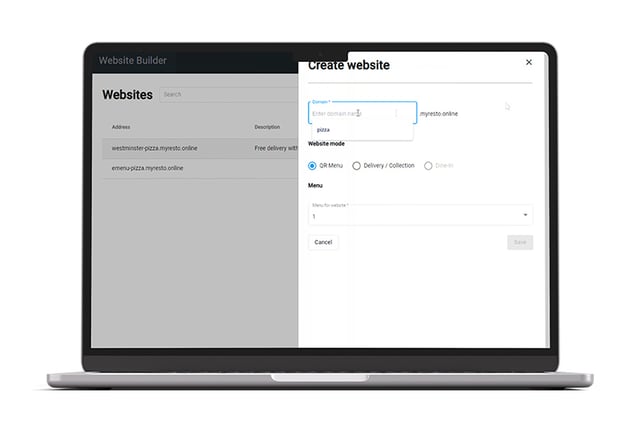
Syrve simplifies what for many operators is a daunting proposition: building, hosting and maintaining a website. Instead of sourcing developers, managing hosting accounts or relying on a disparate array of third-party plugins, our system allows you to create a fully functional website directly within the Syrve platform using the Website Builder App,
The Website Builder App
The Website Builder App is an out-of-the box component that’s available with all Syrve subscriptions. Accessible via Syrve’s web-based office homepage, it allows you to create your own website and display critical information about opening hours, locations and menus. Simple and very easy to use, it’s possible to launch a site that accepts orders for dine-in, delivery and pick-up in as little as twenty minutes.
One of the standout features of the builder app is its flexibility with regards to menu management. Once your site is live, your menu synchronises with the Syrve system, automatically updating item availability, prices and modifiers when you make changes in the backend. The Website Builder App also supports location-specific menus allowing you to serve different menus to different locations.
Payments, order routing and status updates are handled natively within Syrve which means that every single order flows seamlessly into your existing workflows - there’s no need to process orders at point of sale. And all payments are handled safely and securely.
The Syrve Website Builder App essentially features two modes: Delivery/Collection and Dine-In.
- Delivery/Collection Mode - allows you to create a website that takes delivery orders and payments, which are then processed instantly.
- The Dine-In Mode - with the use of QR codes, diners can browse a digital version of your menu using their smartphones.
Delivery/Collection Mode
To create a delivery/collection button, click the green ‘+add’ button in the Website Builder section - you’ll then be presented with a pop-out menu.
Domain Name - The first step is to create a domain name. By default your website will have the extension ‘.eat-me-online’. So if you enter the domain name: “food-delivery” it will display like this:
https://food-delivery.eat.me.online
This is basically a subdomain. So, for example, if you run a chain and publish multiple websites using the Website Builder, all of them will end with the ‘eat.me.online’ extension.
Alternatively, you can also use an existing domain or purchase a new one. The ‘eat-me’ version can then be redirected to it (Syrve’s support team will help you do this).
Menu Selection - Once you’ve chosen your domain name and selected the ‘Delivery/Collection’ radio button, you need to select your menu from a drop-down list. You’ve got two options here. You can either select an existing one that’s already been configured or you can let Syrve auto-generate one based on your stocklist (recommended).

Guided Walkthrough
When you’ve saved your website, you’ll be greeted with a welcome message on your dashboard along with a green ‘apply’ button – clicking this activates a walkthrough that guides you, step-by-step, through final setup. Here’s a run-down of each.
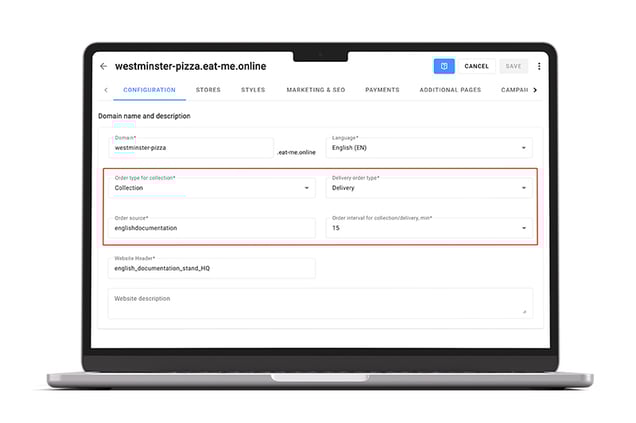
Configuration - here you select order source (which is a POS identifier), META information for your website header and description. You’ve also got a menu block which allows you to make additional changes to your menu.
Specify Delivery Terms - this is where you set terms relating to delivery fees, working hours and delivery zones. Once the latter is set up, the system will be able to determine if a specific customer is within a designated area for delivery.
Stores Set-Up - this stores section is where you map your venue(s) to the website. Each entry has a slide-out panel where you can enter business hours, your chosen delivery zone and fees. You can also include additional delivery terms should you wish.
Styles - the styles section allows you to customise your website theme. You can choose a logo, adjust accents, font colours and styles. There’s also an open graph section where you can add a social media image. So every time you add a link to a platform such as X, it will display automatically.
Marketing and SEO - from this section you can add meta titles and descriptions which appear in Google’s SERPs as well as social media links. Fields are also included in which you can add code/tags for Google Analytics and validation. This means you can track visitor numbers and analyse your site.
Payment Methods - the payments section allows you to choose three methods: card, card to driver and online. If you choose ‘online’ you’ll be able to select payment type from a drop-down menu. The Payment Provider field includes multiple options including Stripe, VIVA and Dojo.
Extra Pages - here, you can add extra information about your operations including a privacy policy and about information.
Dine-In Mode
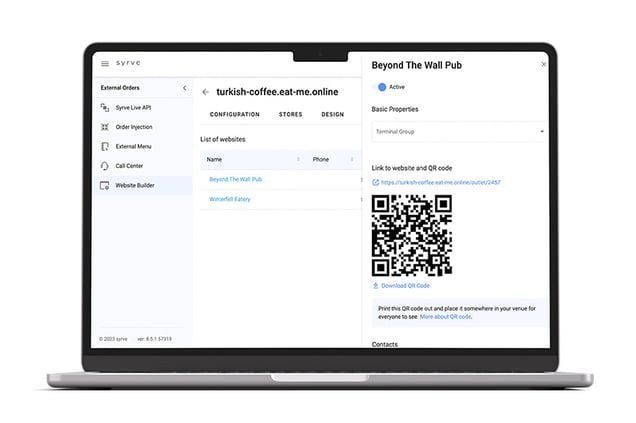
With Dine-In mode, you can create a QR menu that can be published online and which allows customers to scan a code and browse your menu. As with Delivery/Collection mode, you click ‘add’, enter your site name and select the mode from a drop-down menu.
Once you’ve saved your QR menu, you’ll be prompted with the same walkthrough guide where you can add styling, stores setup and payments.
Under the ‘Dine-In Order’ section, the ‘stores’ section displays individual sections for your selected store as well as the number of tables in each section. Each table includes a specific QR code image that can be resized and customised to your liking. All of the QR codes can be downloaded in a single archive and then printed out – each one will correspond to a specific table number.
Final Thoughts
In summary then, the Website Builder App simplifies what is typically a complicated, fragmented and expensive process. By integrating menu management, order routing, delivery and design, it provides you with a fast, reliable way to launch a simple, functional website from which to take orders.
Technical expertise, plugins and external tools are not necessary - just a few guided steps and you’ll be ready to expand your digital presence. In a market where digital visibility and operational efficiency directly influence revenue, Syrve’s Website Builder App gives you the tools to stay competitive and agile.


.jpg?width=390&height=240&name=7.08_header1(1).jpg)