 Dale Shelabarger
For restaurant operators that integrate multiple third-party delivery services, managing menu updates can be problematic.
In some cases, the process is fragmented across platforms, requiring teams to duplicate changes manually within each aggregator interface.
To address this, some operators adopt middleware solutions that serve as a bridge between their POS system and the aggregator. Others take a more integrated approach using their core system to deploy changes.
But even with a middleware or centralised system in place, pushing updates to multiple delivery aggregators is often a multi-step process that can lead to mistakes and inconsistencies. The risk is compounded for multi-site operators, many of whom employ up to 30 separate aggregators at a time.
The most obvious solution is to implement a bulk menu export feature to push updates instantly to all aggregators – a feature that’s surprisingly not universal among the latest RMS platforms.
Following a recent update, this option is now available in Syrve App. Before exploring how the feature works, it is worth adding a little context by reviewing the full process of updating external menus; the digital representations of your in-house menu that display on your website, QR menu and with third-party delivery providers. 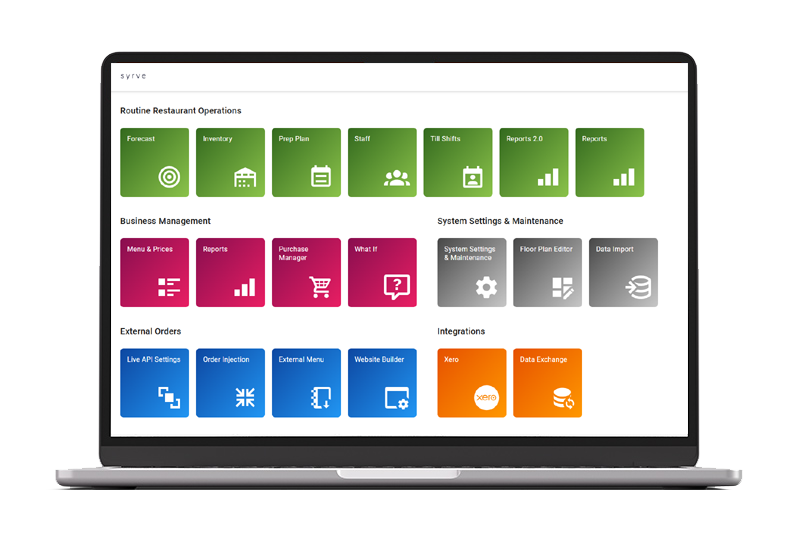 How to Update External Menus in Syrve
To begin with, menu changes such as price adjustments are first performed in the Stock List management section in Syrve’s back office. To reflect these changes digitally, it’s then a case of navigating to the web-based app and accessing the external menu section.
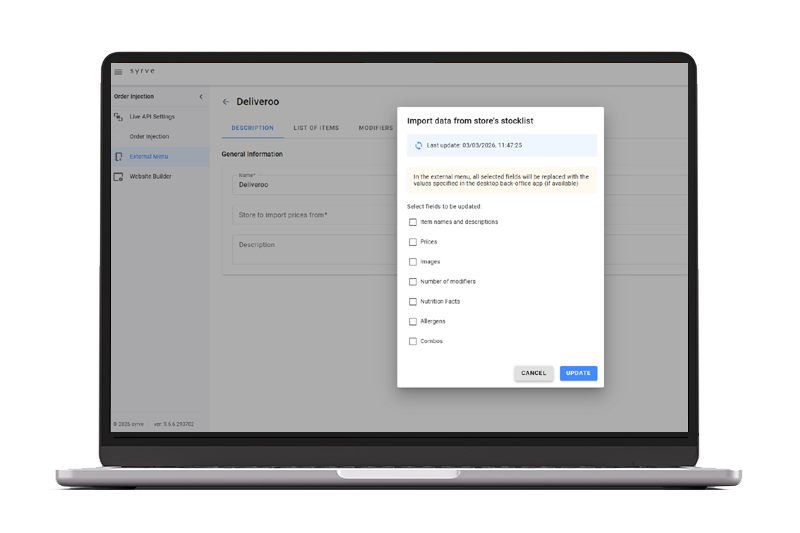
In here, select your external menu from the main list and press the refresh button. You’ll then be presented with a box from which you can select the fields you want to update. These fields provide granular control over each menu item, enabling you to safely sync only what’s needed without overwriting important data.
So, for instance, if you’ve made a price update on a specific dish and changed the allergen information for another, you’d select the ‘menu’ and ‘allergen’ checkboxes respectively and click update. Once this is done, you’ll be ready to export your changes to all delivery aggregators.
Bulk Menu Export in Syrve
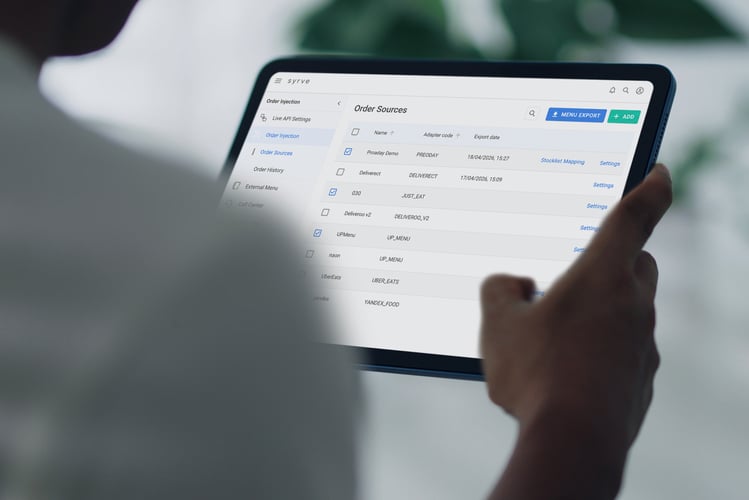
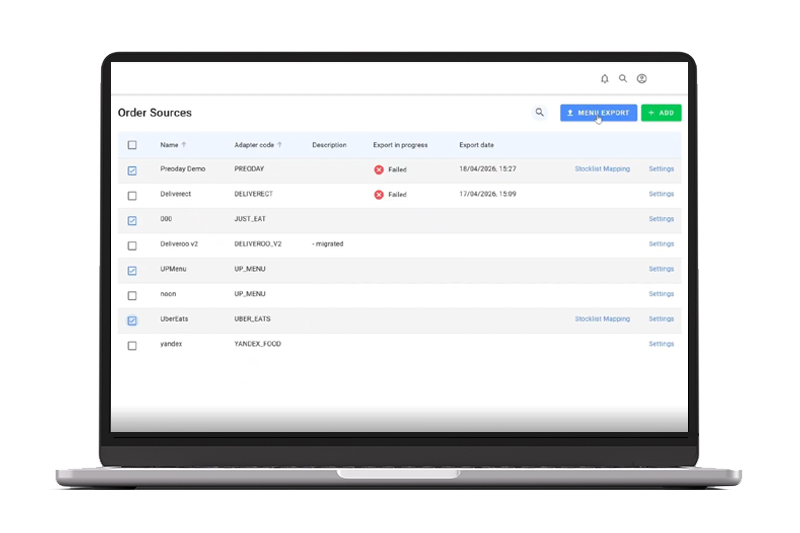
Syrve’s bulk menu export feature can be found in the Syrve App under the order injection tab. Within this tab, all of your third-party aggregators are listed as order sources (provided they’ve been set up).
To process a bulk export, just select all or specific aggregators with the checkboxes provided and click ‘Menu Export’. Your updated menu will then be pushed to all delivery aggregators.
To prevent your UI freezing, each export is processed asynchronously in the background. In other words, you can continue working while exports run without waiting for each one to finish.
Following the update, you’ll receive a status notification for each aggregator within the order source dashboard along with a timestamp.
What This Means for Multi-Site Operators
Multi-site operators managing multiple delivery channels need consistency, speed, and control when deploying menu updates. This requirement becomes even more pressing if their business model demands menu agility.
QSRs, fast-casual and seasonal restaurants all fall under this category - price updates, supplier related ingredient changes and time-sensitive promotions, demand a simple way to update delivery aggregator menus quickly and comprehensively.
A bulk export feature is the easiest way to achieve this, eliminating click-heavy, repetitive processes that slow updates and introduce errors.
Common Use Cases
Here are three examples of how the bulk export feature can be particularly important in certain scenarios.
Rolling Out Price Changes
Volatile ingredient costs are now an unfortunate reality for restaurant operators. As a result, increases often need to be offset by raising prices which then need to be published across multiple sites and aggregators.
This is especially true for farm-to-table restaurants where reliance on local produce and fluctuating availability can significantly impact pricing and menu consistency. A centralised bulk export process helps by ensuring consistent pricing everywhere without relying on manual updates per platform.
Updating Allergen or Product Information
Allergen information is a high-risk area for restaurants with serious consequences for operators who provide inaccurate data.
For food service operators such as bakeries, this requirement is even more pronounced due to frequent product rotation and the extensive use of allergens such as gluten, nuts, and dairy.
Changes to allergen data or product descriptions need to be applied accurately across every delivery channel. In some cases, changes may need to be made urgently.
Running Limited-Time Promotions
Time-sensitive offers require fast deployment. And being able to push updates instantly across all platforms helps ensure promotions go live as planned.
For QSR and fast-casual operators, fumbling around in the settings to export menus for each aggregator is simply not viable. These operators depend on limited-time offers to create urgency and drive traffic.
Conclusion
Manually managing menu updates across multiple delivery aggregators is complicated, slow, and error-prone. Without a centralised approach, the risk of inconsistencies, errors, and delays increases significantly.
A bulk export feature provides a simple, practical solution that allows you to deploy updates fast. As well as improving efficiency, this kind of functionality ensures a consistent customer experience that supports agile, responsive menu management.


.jpg?width=390&height=240&name=7.08_header1(1).jpg)